Skip to content
TenderOS AI for tenders & RFPs
Free · no account · no upload

Free RFP Requirement Extractor

A free RFP requirement extractor that runs in your own browser. Paste the RFP and see how many obligation statements it holds and how many of them are mandatory, with three examples pulled straight from your text. Counted from your own document, nothing uploaded.
or paste the tender text

Detection

The language that marks a requirement

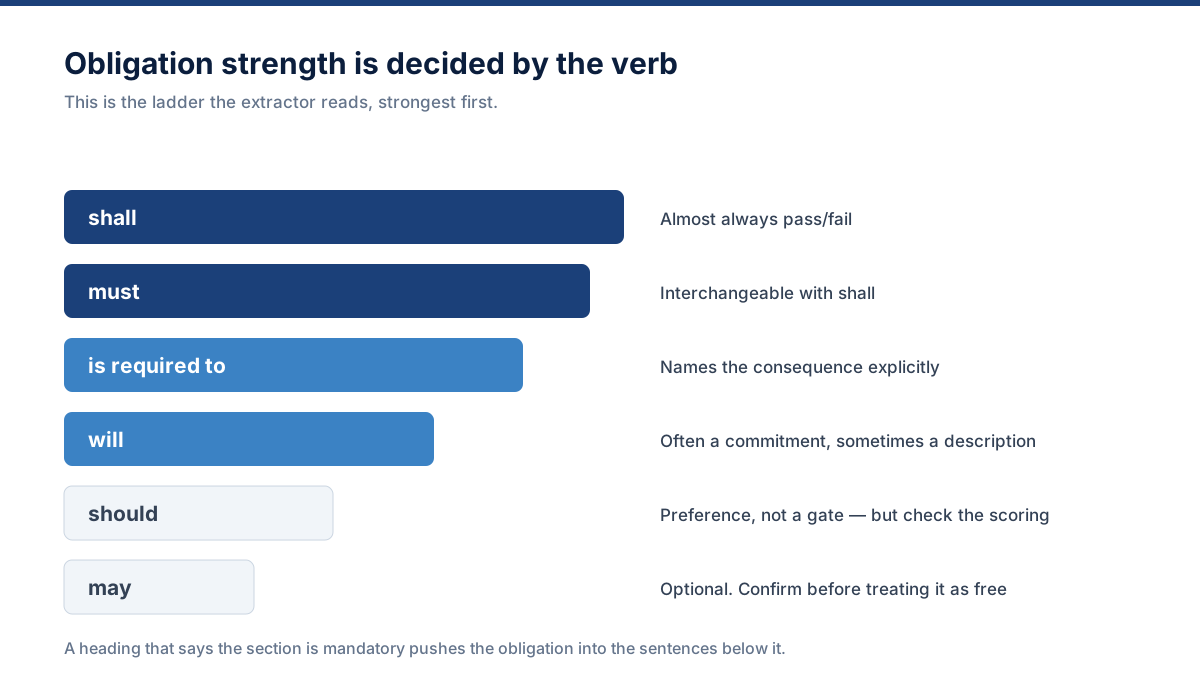
Formal procurement drafting is unusually consistent about how it states an obligation. These are the markers the extractor watches for, and what each one usually means.

shall
The strongest obligation marker in formal procurement drafting. Almost always pass/fail.
must
Interchangeable with shall in most tenders. Treat identically until proven otherwise.
is required to / are required to
An obligation stated indirectly. Easy to miss when skim reading.
mandatory
Usually flags a whole section, so the obligation may sit in the sentences that follow.
will be rejected / deemed non-compliant
Names the consequence explicitly. The highest-priority rows in your matrix.
condition of participation
An eligibility gate. Check this before committing any drafting effort.
failure to provide / failure to comply
Points at a specific deliverable whose absence carries a penalty.
minimum requirement / at a minimum
A threshold you either clear or do not. Verify against real evidence.
provide / describe / submit / demonstrate
Instruction verbs. Not always mandatory, but always work for someone.
should / may / is expected to
Softer language. Often scored rather than pass/fail — still worth answering.
Rules first, model second. Mandatory detection runs on explicit patterns rather than on a language model's judgement. A model can help classify and normalise a clause once it has been found, but it should never be the only thing standing between your team and a missed pass/fail requirement.
After extraction

A list of requirements is not yet a plan

Extraction is the first of four steps, and on its own it changes very little. The list becomes useful when each row acquires a category, an owner, a piece of evidence and a status — which is the difference between a document you have read and a bid you are running.

That is what a paid workspace adds. Every extracted requirement lands in a compliance matrix, gets checked against your Company Brain to see whether the proof already exists, gets assigned to the person who can actually answer it, and gets tracked to approval.

  1. Extract every obligation from the full document pack
  2. Classify it and mark whether it is pass/fail
  3. Match it against evidence you can actually produce
  4. Assign, draft, review, approve and validate before submission

The full extraction method

Questions

Requirement extraction: common questions

What does the requirement extractor pull out?
Every statement in the document that carries an obligation or an instruction: pass/fail clauses, evidence requests, questions demanding a written response, submission rules and eligibility conditions. Each one keeps its clause reference where the document numbers its sections.
How accurate is automated requirement extraction?
Obligation language is detected by explicit rules rather than by a model guessing, so mandatory clauses are found consistently. What no automated pass can do is judge intent perfectly — a sentence can be an obligation without any modal verb in it. Treat the output as a complete first pass to review, not as a substitute for reading the pack.
Where do requirements usually hide?
Outside the scope of work. General terms and conditions, the instructions to bidders, the pricing template preamble, the forms themselves, the annexes, and anything issued later as an addendum. Extracting only from the main specification is how teams miss disqualifying clauses.
Can I export the full requirement list?
The free preview shows the counts plus three example rows. Complete extraction, owner assignment, evidence matching and XLSX or DOCX export are part of the paid workspace, which starts at 299 dollars a month.
Does it handle a multi-document tender pack?
The browser tool takes one document at a time, and you can run each one separately. Paid workspaces are built for the full pack: main RFP, terms, specifications, pricing template, forms, annexes and addenda, each classified rather than merged.